










What Does an Optical Cord Do?
Key Takeaways
● An optical cord sends audio as pulses of light, giving you clear sound with no electrical noise.
● It handles stereo PCM Dolby Digital (up to 5.1), and DTS formats, but not high-bit-rate lossless codecs like Dolby TrueHD or DTS-HD Master Audio.
● You’ll find optical ports on TVs, soundbars, and home theater receivers when you need simple, reliable connections without ground-loop hum.
● For long-distance runs or data networking, glass-fiber versions carry signals for miles with very low loss.
● Picking the right cable means matching the fiber type (plastic vs. glass), length, and connector quality to your setup.
1. Introduction
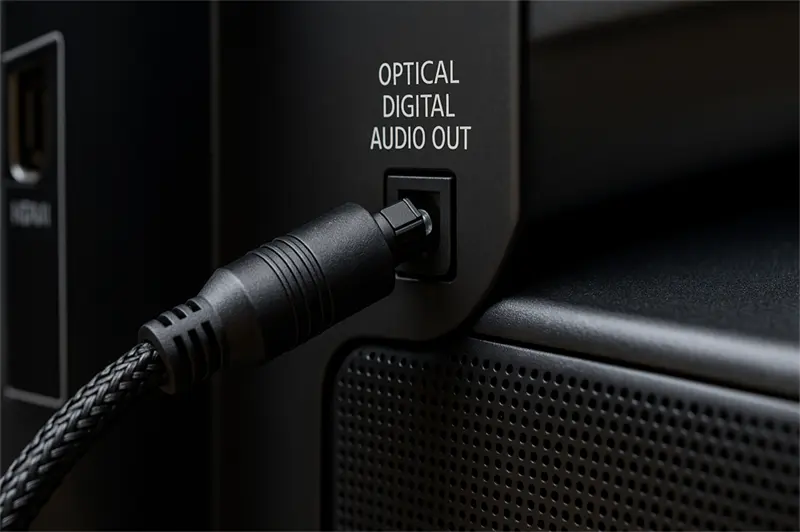
You might spot an “Optical” or “Digital Audio Out” port on the back of your TV, soundbar, or AV receiver and think it’s just another input. But knowing what an optical cord does can save you from annoying audio drop-outs, ground-loop hum, and compatibility headaches—especially when pairing modern displays with legacy audio gear or routing noise-free audio in complex home theater setups.
An optical cable, often called TOSLINK (Toshiba Link) or a digital optical cable, transmits audio as pulses of infrared light rather than electrical signals. This simple shift removes nearly all interference, keeps your listening experience pure, and extends beyond consumer-grade audio into data-center interconnects, broadband “last mile” delivery, and precision industrial sensors.
This article explores:
● What an optical cord is and where it came from
● How it actually works to carry audio
● Key benefits over other cable types
● Real-world use cases in home theaters, networking, broadband, and medical/industrial fields
● Side-by-side comparisons with HDMI ARC/eARC, coaxial digital, and analog cables
● How to choose, install, and troubleshoot optical cables
● Emerging trends that will shape the future of fiber-optic links
By the end, you’ll understand what an optical cord does, when to use one, and how to pick the right cable for any application.
2. What Is an Optical Cord?
An optical cord—also known as a digital optical cable or TOSLINK—is a cable that carries digital audio data via light pulses through a thin fiber. Unlike copper-based cables, it uses either glass or plastic fiber to transmit information, making it 100% immune to electromagnetic interference (EMI) and ground-loop hum common with electrical connections.
Originally introduced by Toshiba in 1983 to link CD players to receivers, the TOSLINK standard soon became the go-to for connecting consumer audio components. Over time, the form factor evolved into Mini-TOSLINK (3.5 mm plug for laptops and portable devices) and low-cost plastic optical fiber (POF) variants for budget-friendly applications and short runs.
2.1 Terminology
● TOSLINK: The most common name, derived from “Toshiba Link,” standardized by the Optical Communications Association.
● Digital Optical Cable: A generic term used on packaging and user manuals.
● Optical Cord/Optical Cable: Casual name emphasizing the light-based transmission.
2.2 Brief History
● 1983: Toshiba launches the first TOSLINK standard for CD-to-receiver connections.
● Late 1980s–1990s: Adoption spreads across DVD players, soundbars, and early home theater receivers.
● 2000s: Mini-TOSLINK appears on laptops and portable audio devices.
● 2010s: Plastic optical fiber variants lower cost for short consumer runs; glass fiber remains dominant in professional, networking, and industrial uses.
3. How It Works
Transmitting audio via light may sound futuristic, but the process is straightforward:
1.Electrical → Light conversion
An LED (or in high-end gear, a laser diode) encodes the digital audio stream (S/PDIF) into pulses of infrared light.
2.Light travels through the fiber
Inside the fiber’s core, light reflects off the cladding walls thanks to total internal reflection, keeping nearly all energy inside the core without leakage.
3.Light → Electrical conversion
At the receiving end, a photodiode or similar sensor detects the light pulses and converts them back into an electrical S/PDIF signal, which your AV receiver or TV processes into audio.
3.1 Key Components
● Core: The central fiber (glass or plastic) that carries light.
● Cladding: A surrounding layer of lower refractive index that traps light in the core.
● Buffer/Jacket: Protective coatings that shield the delicate fiber from physical damage and moisture.
3.2 Supported Formats
|
Format |
Channels/Notes |
|
PCM 2.0 |
Uncompressed stereo |
|
Dolby Digital |
Compressed surround up to 5.1 |
|
DTS Digital Surround |
Compressed surround |
|
DTS-ES (Matrix/Dis.) |
6.1 channels |
|
DTS 96/24 |
96 kHz/24 bit stereo |
Formats like Dolby TrueHD, DTS-HD Master Audio, Dolby Atmos, and DTS:X exceed optical’s ~1.4 Mbps bandwidth and require HDMI eARC or other higher-bandwidth links.
4. Why Use One?
4.1 Zero Electrical Noise
With no metal conductor, an optical cable is immune to RFI/EMI and eliminates ground-loop hum—common issues when connecting gear across multiple mains outlets.
4.2 Reliable Surround Sound
Most consumer A/V setups (2.0 stereo to 5.1 surround) work flawlessly over optical. It’s an easy way to get Dolby Digital or DTS without HDMI complexities.
4.3 Flexible Run Lengths
● Plastic Optical Fiber (POF): Up to ~10 m at typical home-theater distances with minimal loss.
● Glass Fiber: Supports runs of hundreds of meters to kilometers (multi-mode) or tens of kilometers (single-mode) with very low attenuation, ideal for data centers and telecom.
4.4 Durability
Properly buffered fibers resist corrosion and moisture, making them suitable for rugged industrial environments and even outdoor installations when housed in armored jackets.
5. Where You’ll See It
5.1 Home Theaters
Connecting a TV’s optical out to a soundbar or AV receiver is often the simplest way to enable 5.1 surround sound on TVs without HDMI ARC support.
5.2 Legacy Audio Gear
Many CD players, DACs, and older gaming consoles include TOSLINK but lack modern HDMI audio out. Optical lets you integrate them into newer AV systems without noise.
5.3 Data Centers & Enterprise Networking
Multi-mode and single-mode fibers transmit 10/25/40/100 GbE signals between servers and switches, providing low latency, high throughput, and isolation from electrical faults.
5.4 FTTx Broadband
GPON and XG-PON systems deliver gigabit internet to homes and apartments via fiber-optic lines, often terminating in optical network terminals with POF jumpers to routers.
5.5 Medical & Industrial Sensing
● Endoscopy & OCT Imaging: Thin fiber probes guide light into the body and return high-resolution images for diagnostics.
● Distributed Fiber Sensing: Measure temperature, strain, or pressure along pipelines, bridges, and structures using backscattering effects in the fiber.
6. How It Stacks Up
|
Feature |
Optical (Plastic) |
Optical (Glass) |
HDMI ARC/eARC |
Coaxial Digital |
Analog (RCA/3.5 mm) |
|
Bandwidth |
~1.4 Mbps |
Gigabits+ |
Up to 48 Gbps |
~0.9 Mbps |
Analog stereo only |
|
Max Distance |
~10 m |
Kilometers |
~10 m |
~10 m |
~3 m |
|
EMI Immunity |
Complete |
Complete |
Partial (shielded) |
Good (shielded) |
Poor |
|
Signal Security |
Fiber-isolated |
Fiber-isolated |
Electrical |
Electrical |
Electrical |
|
Cost |
Low |
Medium |
High |
Low |
Very low |
Optical cables strike a strong balance of low cost, EMI immunity, and ease of use, making them ideal for consumer audio and moderate-distance data links.
7. Picking the Right Cord
7.1 Fiber Type
● Plastic Optical Fiber (POF): Best for up to 10 m consumer audio runs.
● Multi-Mode Glass: Suited for hundreds of meters in data centers or campus networks.
● Single-Mode Glass: Handles tens of kilometers for telecom and long-haul applications.
7.2 Length & Attenuation
Check the dB/km rating: a lower number means less signal loss over distance. For POF, stay under 10 m without signal boosters.
7.3 Connector & Jacket Quality
Metal-ferrule TOSLINK plugs offer better durability and alignment than basic plastic connectors. Braided or PVC jackets improve strain relief and protection.
7.4 Budget Considerations
Most sub-$20 optical cables perform identically. Avoid overpriced “audiophile” brands that offer no real audio benefit beyond marketing.
8. Setup and Fixes
8.1 Proper Routing
Maintain gentle curves; avoid bends tighter than a 4 cm radius to prevent micro-bends that attenuate light.
8.2 Common Faults
Broken connector tabs, dust or debris on end-faces, and physical kinks in the fiber lead to drop-outs.
8.3 Cleaning & Testing
● Swap cables to isolate the problem.
● Use lint-free swabs and ≥90% isopropyl alcohol to clean end-faces, then air-dry.
● Ensure source/device audio output is set to “Optical” or “Digital Out”.
9. What’s Next for Optical Cords?
9.1 Silicon Photonics
Integrating optical transceivers on silicon chips will bring high-speed, low-power links inside servers, PCs, and mobile devices, reducing reliance on copper traces.
9.2 Quantum Key Distribution (QKD)
Quantum-secure fiber links promise unbreakable encryption for banking, defense, and critical infrastructure over existing fiber networks.
9.3 AI-Driven Smart Fiber Networks
Advanced monitoring and predictive maintenance will detect fiber faults before users notice glitches, enabling self-healing optical grids.
10. Conclusion
An optical cord delivers noise-free digital audio and underpins global data networks. Whether you’re upgrading a stereo, building a home theater, or architecting a high-speed data center, understanding what an optical cord does empowers you to choose the right cable, install it correctly, and enjoy interference-free performance for years to come.
FAQ
1.What audio formats work over optical?
PCM 2.0, Dolby Digital (up to 5.1), DTS Digital Surround, DTS-ES, and DTS 96/24.
2.Can optical handle Dolby Atmos or DTS:X?
No—optical’s ~1.4 Mbps limit requires HDMI eARC for high-bit-rate or object-based codecs.
3.How long can I run a plastic optical cable?
Up to ~10 m before loss becomes audible; glass fiber extends much farther.
4.Why pick optical over HDMI ARC?
Offers 100% immunity to electrical noise, works with legacy gear, and avoids ground-loop hum.
5.How do I clean optical cable ends?
Gently wipe with a lint-free swab and ≥90% isopropyl alcohol, then let air-dry.
6.Is glass-fiber optical only for professionals?
Glass fiber is more expensive but provides kilometer-scale runs with almost zero loss.
7.What causes optical drop-outs?
Sharp bends, dirty or damaged connectors, and misaligned ferrule tabs.
8.Can I use optical cables outdoors?
Yes—choose cables with UV-resistant jackets or armored fiber for direct burial.
9.What is Mini-TOSLINK?
A 3.5 mm miniaturized TOSLINK connector for laptops and portable audio devices.
10.Are expensive optical cables worth it?
No—basic cables under $20 perform just as well as premium brands.
References
1.What Is the Optical Audio Port, and When Should I Use It? – HowToGeek
2.What Are Optical Cables, How Do They Work? – CustomHT
3.TOSLINK – Wikipedia
4.What Are Digital Optical Cables? – SVSound
5.Optical Audio Cable Guide – RS Online
6.What Is an Optical Digital Cable & How It Improves Sound – GearIt
7.How to Connect External Audio Using an Optical Cable – Samsung SG